Mon to Fri, 8:00am to 5:00pmUtalii Court, Gesora Road, Nairobi

+254 184 379 590+254 719 450 317 Altinfo@gstechguard.co.ke

Power and weighing

UPS sizing guide: how to choose the right kVA and runtime

A step-by-step UPS sizing guide for Kenyan offices, server rooms and security systems, covering load lists, watts and kVA, headroom, runtime, battery banks, online versus line-interactive and common mistakes.

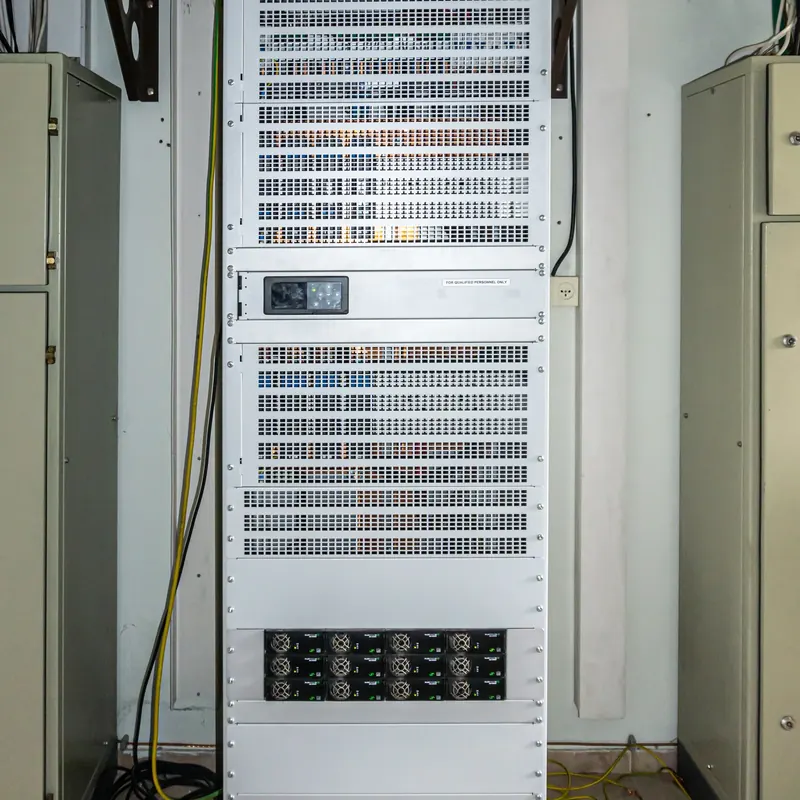
UPS units in a server room, sized using a UPS sizing guide

Quick answer

To size a UPS, add up the watts of every device it must support, then add 25 to 30 percent headroom. Next, choose a UPS whose watt rating, not only its kVA, covers that figure. Finally, size the batteries for the runtime you need, based on your outage pattern and whether a generator starts.

This UPS sizing guide explains how to choose the right capacity and runtime for an office, server room, CCTV system or network cabinet in Kenya. Many UPS units fail early or shut down during outages simply because someone chose them by guesswork. However, the method is not complicated. With a load list, a little arithmetic and a clear runtime target, you can size a UPS that works for years. For installation, see our UPS power backup service, and for older units, our UPS repair and battery replacement service.

How it works

Step 1 in this UPS sizing guide: list the load

First, list every device the UPS must support and its power in watts. You will find the figure on the label, the power supply or the datasheet. If only amps are shown, multiply amps by 230 volts to get an estimate.

Device Typical power
Desktop computer and monitor 80 to 200 W
Small server 200 to 500 W
Network switch (non-PoE) 20 to 50 W
PoE switch with cameras or access points 50 to 400 W
Router or firewall 10 to 40 W
CCTV recorder 20 to 60 W
Access control panel and locks 20 to 60 W per controller

In addition, decide which devices are truly critical. For example, printers, heaters and kettles should never be on a UPS. Laser printers in particular draw large surges that can overload it.

Step 2: understand watts and kVA

UPS units are usually labelled in kVA, for example 1 kVA or 3 kVA. However, the number that matters for your load is the watt rating. Each UPS has a power factor that links the two. Many modern units have a power factor of 0.8 to 0.9, so a 1 kVA UPS may support 800 to 900 W.

Therefore, always check the watt rating on the datasheet. A common mistake is assuming that a 1 kVA UPS supports 1,000 W.
Step 3: add headroom

Next, add 25 to 30 percent headroom to your total load. Headroom covers startup surges, battery ageing and future equipment. In addition, a UPS running near full load runs hotter and gives much shorter runtime.

For example, a load of 600 W plus 30 percent headroom gives 780 W. As a result, you would choose a UPS rated at least 800 W, which is often a 1 kVA unit with a 0.8 or 0.9 power factor.

How it works

Step 4: choose a runtime target

As a rough guide, many urban offices with a generator need 10 to 15 minutes. Offices without a generator often aim for 30 to 60 minutes. Meanwhile, security systems at remote sites may need several hours, which usually means external battery banks or solar support.

How it works

Step 5: size the batteries

Runtime depends on battery capacity and load. Battery capacity is stated in amp-hours (Ah) at a given voltage. A simple estimate is:

Runtime in hours ≈ (battery voltage × amp-hours × 0.8) ÷ load in watts

The 0.8 factor allows for inverter losses and safe discharge. For example, a 24 V battery bank of 100 Ah gives about 1,920 watt-hours of usable energy. At a 400 W load, that is roughly 4.8 hours, before ageing. In practice, manufacturers publish runtime charts, which are more accurate than this estimate. So use the formula to plan, then confirm with the chart.

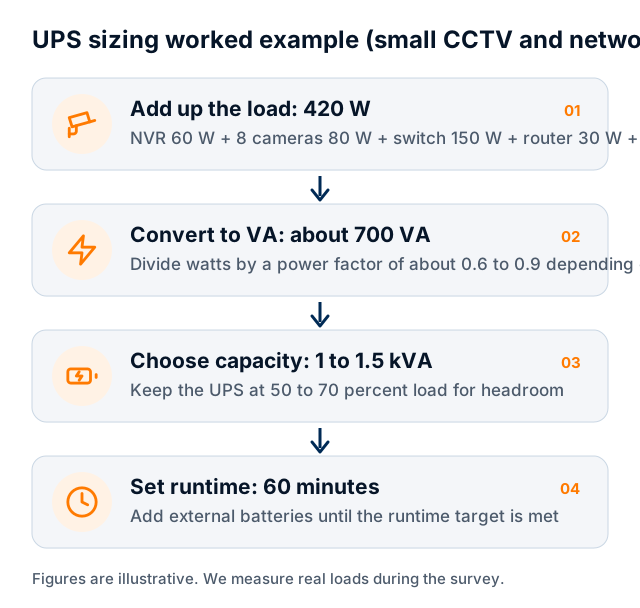
Worked example of UPS sizing

Power backup

Worked example from this UPS sizing guide

A 1 kVA online UPS rated at 900 W covers the load. For one hour of runtime at 530 W, you need about 530 watt-hours of usable energy, plus margin. Internal batteries alone may give only 10 to 20 minutes, so you would add an external battery pack. In this way, the UPS sizing guide method turns a load list into a clear specification.

UPS sizing guide for Kenya

Online or line-interactive?

Capacity is only one part of the choice. The UPS type matters too.

Feature Line-interactive Online (double conversion)
Power quality Corrects small voltage changes Fully cleans and regulates power
Transfer to battery Brief switch time No switch time
Best for CCTV cabinets, small networks, desktops Servers, sensitive equipment, poor supply
Cost Lower Higher
Efficiency Higher Slightly lower

In Kenya, sites with frequent dips and surges, such as factories, benefit from online units. By contrast, a small office network may work well with a line-interactive UPS.

Power backup

Common UPS sizing mistakes

  • Choosing by kVA instead of watts
  • No headroom, so the UPS runs at full load
  • Putting printers or heaters on the UPS
  • Ignoring runtime and relying on internal batteries only
  • Placing the UPS in a hot cupboard, which shortens battery life
  • Forgetting the router, so remote access fails during outages
  • Never testing the batteries

Fortunately, each mistake is easy to avoid once you follow this UPS sizing guide.

Power backup

Battery life and replacement

Sealed lead-acid batteries usually last three to five years. Heat is their biggest enemy, so keep the UPS in a cool, ventilated place. Frequent outages also wear batteries faster. Lithium batteries last longer and cope better with frequent cycles, though they cost more at the start.

In addition, test batteries every six months and replace them before they reach the end of rated life. Our IT annual maintenance contracts can include these checks.

Costs and pricing

Indicative UPS costs in Kenya

System Indicative range (KSh)
Line-interactive UPS for CCTV or network cabinet (1 to 2 kVA) 25,000 to 70,000
Online UPS for small server rack (1 to 3 kVA, about one hour) 60,000 to 250,000
Online UPS for server room (6 to 20 kVA with external batteries) 400,000 to 2,000,000+
Battery replacement per set 8,000 to 150,000+

These 2026 ranges are indicative. For more, see our security systems price guide.

Power backup

UPS sizing for security systems

CCTV, access control and gate systems have their own needs. For example, infrared cameras draw more power at night, and gate motors need separate batteries. Our guide to UPS backup for CCTV and networks covers these systems in detail.

UPS sizing guide for server rooms

Server rooms need more care than single cabinets. First, list every rack and its load, including servers, storage, switches and cooling controls. Second, decide whether air conditioning must stay on during outages, because servers overheat quickly without cooling. If it must, the UPS alone is rarely enough, so a generator becomes essential. Third, consider redundancy. For example, two UPS units sharing the load keep the room running if one fails. In addition, plan a maintenance bypass, so batteries can be replaced without shutting down servers. Our guide to server room checklists covers cooling, power and access in more detail.

When to use this UPS sizing guide again

Loads change over time. New servers, more cameras or extra access points all add watts. So revisit this UPS sizing guide whenever you add equipment, and at least once a year. In particular, check the UPS load reading on its display or software. If it regularly runs above 70 to 80 percent, plan an upgrade or move some equipment to another unit. Similarly, if runtime during real outages is shorter than expected, test or replace the batteries.

How it works

Electrical installation and safety

Larger UPS units should be installed by a qualified electrician on a dedicated circuit, ideally with a maintenance bypass switch. This switch lets you service the UPS without switching off the load. In addition, the electrical installation should follow Kenyan wiring rules, and the Energy and Petroleum Regulatory Authority licenses electrical contractors.

To size a UPS for your site, request a site survey.

Get started

Book a site survey

Tell us about your site and an engineer will call you back within one working day to discuss your needs and arrange a visit.

  • Clear, itemised written quote
  • Security, network, fire and power from one team
  • Support and maintenance after handover

Prefer to talk? Call +254 184 379 590

We reply within one working day. Or call +254 184 379 590.

Frequently asked questions

What size UPS do I need?

Add up the watts of every device the UPS must support, then add 25 to 30 percent headroom. Choose a UPS whose watt rating covers that figure, then size the batteries for the runtime you need.

Is 1 kVA the same as 1,000 watts?

No. A UPS has a power factor, often 0.8 to 0.9, so a 1 kVA unit usually supports 800 to 900 W. Always check the watt rating on the datasheet.

How long do UPS batteries last?

Sealed lead-acid batteries usually last three to five years, less in hot rooms or with frequent outages. Lithium batteries last longer. Test them every six months.

Can a UPS run CCTV for hours?

Yes, with enough battery capacity. Small internal batteries usually give minutes, so long runtimes need external battery banks, a generator or solar support.

Planning a project or fixing a fault?

Tell us about the site. We will arrange a survey, give you a clear written quote and explain the options in plain language.

CallWhatsAppAsk usQuote